
Why Can’t My AI Search Across All Our Enterprise Systems?
Updated: Sep 22
Organizations are adding AI assistants across Microsoft 365, Google Workspace, CRM systems, knowledge bases, service platforms, project tools, and other applications. That raises a simple question:
If the AI can search company information, why can’t it search all of it?
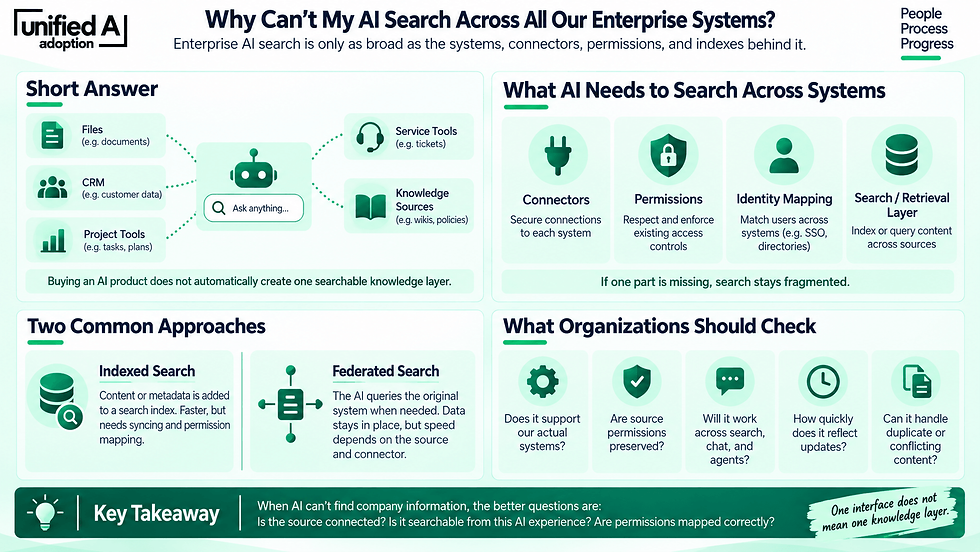
The short answer is that enterprise AI search is only as broad as the systems, connectors, permissions, and indexes behind it. Buying an enterprise AI product does not automatically create one searchable knowledge layer.
Why Enterprise AI Search Still Feels Fragmented
AI may provide a single interface, but the underlying data still lives in separate systems. For an AI assistant to search across them, it generally needs:
a connector to each source;
permission to retrieve or index that content;
identity mapping so users see only what they are authorized to access;
and a search or retrieval layer that can bring those sources together.
That is why a connector can exist without every AI experience automatically using it.
How Major Platforms Approach Cross-Enterprise Search
Vendors are solving this in different ways.
Platform | Cross-enterprise approach | Current distinction |
Microsoft 365 Copilot Search | Uses Copilot connectors to bring external content into Microsoft 365 through indexed or real-time retrieval. | Microsoft supports more than 100 prebuilt connectors across systems such as Google Drive, Salesforce, ServiceNow, Jira, Confluence, Workday, and Zendesk. |
Google Gemini Enterprise | Connects business systems to Gemini so users can search and ask questions across organizational data. | Google supports sources including Google Drive, OneDrive, SharePoint, HubSpot, Jira, and others. |
Atlassian Rovo | Uses Teamwork Graph and connectors to make Atlassian and third-party content available to Rovo Search, Chat, and Agents. | Atlassian supports synced, direct, and Smart Link connectors, with source permissions respected. Most connectors are configured per Atlassian site, which can still create boundaries in multi-site environments. |
Glean | Creates a dedicated enterprise search and AI layer across connected workplace applications. | Glean positions cross-system search as a core capability and supports hundreds of connectors. |
Coveo | Ingests content from multiple systems into a unified search index with permission-aware retrieval. | Coveo focuses heavily on enterprise search, relevance, and access controls across many repositories. |
The difference is architectural. Microsoft and Google extend AI search outward from their ecosystems, while Glean and Coveo are designed more explicitly as cross-system enterprise search layers.
Indexed Search vs. Federated Search
One important distinction is where the search happens. With indexed search, content or metadata from connected systems is copied into a search index. That can make cross-system search faster, but it requires synchronization and permission mapping.
With federated search, the AI queries the original system when the user asks a question. Data can stay in place, but speed and reliability depend more heavily on the source and connector. Some platforms now support both approaches.
Why Everything Still Doesn’t “Just Connect”
Imagine an organization with policies in SharePoint, customer data in Salesforce, project information in Jira, conversations in Teams, and files in Google Drive. A unified AI experience has to know:
who the user is;
which records that person may access;
how permissions differ across systems;
how current the information is;
and how to rank conflicting or duplicate results.
That is much harder than simply connecting an LLM to several APIs. It also explains why two vendors can both advertise “enterprise search” while delivering very different experiences.
Cross-Enterprise Search Is Also a Governance Problem
The question should not simply be:
How do we connect everything?
It should also be:
What should this AI be allowed to find, for whom, and under what conditions?
AI can make existing permission problems more visible. If someone already has overly broad access in a source system, an AI search layer may make that information much easier to discover. That makes identity management, permission-aware retrieval, connector governance, source ownership, and content quality part of the search decision.
What Organizations Should Evaluate
Before choosing a platform based on its promise to “search across everything,” test what that actually means in your environment. Check whether it can:
search the systems you actually use;
preserve source permissions;
handle multiple instances of the same application;
reflect changes quickly;
support custom connectors where needed;
and make connected knowledge available consistently across search, chat, and agents.
Also test the messy cases: duplicate documents, conflicting policies, archived content, renamed files, and users with different access levels.
The Bigger Shift
Enterprise AI search is moving toward what employees have wanted for years: ask one question and find the right information without needing to know which application contains it. Microsoft, Google, Atlassian, Glean, Coveo, and others are all moving in that direction, but through different architectures and ecosystems.
So when an AI assistant cannot find something that “exists somewhere in the company,” the better questions are: Is the source connected? Is it searchable from this AI experience? Are permissions mapped correctly? And is the information available to this user? That is where cross-enterprise search really begins.
Use this Prompt: Act as an enterprise AI search architect. Help me evaluate how well our current systems could support cross-enterprise AI search. Our organization uses: [list systems, such as Microsoft 365, SharePoint, Salesforce, Jira, Confluence, Google Drive, Slack, ServiceNow, etc.]. For each system, identify what an AI search platform would need in order to retrieve its information, including connector availability, indexed vs. federated retrieval, identity and permission requirements, data freshness, and any likely limitations. Then create a table showing: system, information stored there, likely retrieval method, permission considerations, potential gaps, and questions we should ask the vendor. Do not assume that having a connector means the content is available in every search, chat, or agent experience. Clearly identify anything that would need to be verified with the vendor.


![How Ready Is Your Organization for AI? [Quiz]](https://static.wixstatic.com/media/e83432_2ae092465ef145b0abf557a339635cf2~mv2.jpg/v1/fill/w_556,h_528,al_c,q_80,enc_avif,quality_auto/e83432_2ae092465ef145b0abf557a339635cf2~mv2.jpg)
Comments