
How Do I Build Technical Training with AI?
Updated: Sep 8
Creating technical training that is accurate, engaging, and scalable can be time-consuming—unless you harness the power of AI. Whether you're building product education, onboarding programs, or enablement courses, AI can help you draft, refine, and scale content aligned to real team needs.
This guide walks you through a proven process for building training using AI-powered search, chat, and agent-like features, supported by hands-on strategy.
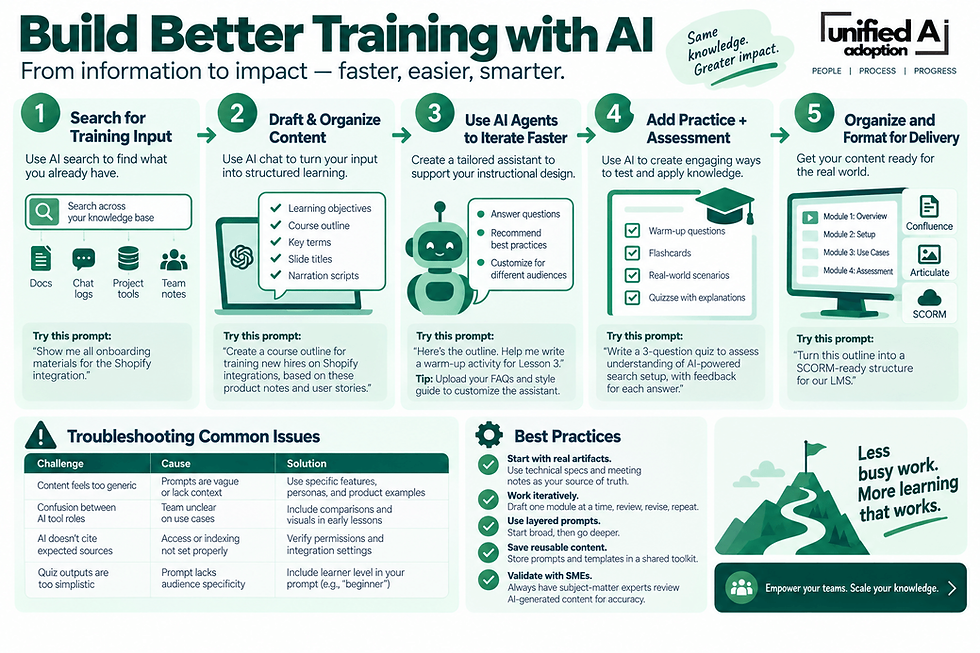
Step 1: Use AI Search to Gather Training Input
Before writing anything, use an AI search tool to mine your organization’s existing knowledge base.
Actions:
Search across tools like document hubs, chat logs, project trackers, and cloud storage for:
Product specifications
Developer documentation
Team meeting notes
Previous onboarding materials
Tip: Try AI-powered search prompts like:
“Show me all onboarding materials for the Shopify integration.”
“What’s the current documentation on Shopify customization options?”
Why It Matters: Start from real-world context instead of guessing or duplicating effort. AI search can surface content from scattered sources, making it easier to build from what's already known.
Step 2: Use AI Chat to Draft & Organize Course Content
Turn what you find into structured lessons using generative AI as your instructional design assistant.
Actions:
Ask the AI to help draft:
Learning objectives
Outlines based on epics or documentation
Key terms and glossary entries
Slide titles and narration scripts
Prompt Example: “Create a course outline for training new hires on Shopify integrations, based on these product notes and user stories.”
Why It Works: AI helps translate technical complexity into organized, audience-ready learning assets.
Step 3: Use AI Agents or Assistants to Iterate Faster
Some AI tools allow you to create reusable “agents” or tailored assistants to speed up instructional design.
Examples of Agent Tasks:
Answer instructional design questions
Recommend best practices
Customize course structure for different audiences
Prompt Examples:
“I’m building a course for non-technical users. How should I explain the difference between basic setup and advanced customization?”
“Here’s the outline. Help me write a warm-up activity for Lesson 3.” (Paste content)
Tip: Customize your AI assistant with your organization’s tone, acronyms, and examples by uploading key documents or FAQs.
Step 4: Add Practice + Assessment with AI
Use AI to generate formative and summative assessments.
Examples:
Warm-up questions
Flashcards for key terms
Hands-on tasks and real-world scenarios
Multiple-choice quizzes with answer rationales
Prompt Examples:
“Write a 3-question quiz to assess understanding of AI-powered search setup, with feedback for each answer.”
“Give me a practical task where a learner distinguishes between rule-based automation and generative AI.”
Step 5: Organize and Format for Delivery
AI can also support deployment readiness.
Use AI to:
Suggest LMS module structure (e.g., by job role or product area)
Format content for use in tools like Confluence, Articulate, or SCORM platforms
Auto-generate checklists for trainers and course owners
Prompt Example: “Turn this outline into a SCORM-ready structure for our LMS.”
Troubleshooting Common Issues
Challenge | Cause | Solution |
Content feels too generic | Prompts are vague or lack context | Use specific features, personas, and product examples |
Confusion between AI tool roles | Team unclear on use cases | Include comparisons and visuals in early lessons |
AI doesn’t cite expected sources | Access or indexing not set properly | Verify permissions and integration settings |
Quiz outputs are too simplistic | Prompt lacks audience specificity | Include learner level in your prompt (e.g., “beginner” or “developer”) |
Best Practices
Start with real artifacts: Use technical specs and meeting notes as your source of truth.
Work iteratively: Draft one module at a time with AI, review, revise, repeat.
Use layered prompts: Start broad (“Give me an outline”) and go deeper (“Write an example for Lesson 1”).
Save reusable content: Store prompts and templates in a shared toolkit.
Validate with SMEs: Always have subject-matter experts review AI-generated content for accuracy.


Comments